 Continuing Legal Education (MCLE) in California, MCLE Los Angeles, CLE Orange County, Irvine & San Francisco
Today I noticed something I've never seen before on the PACER Case Locator search results page – a Filter Results button.
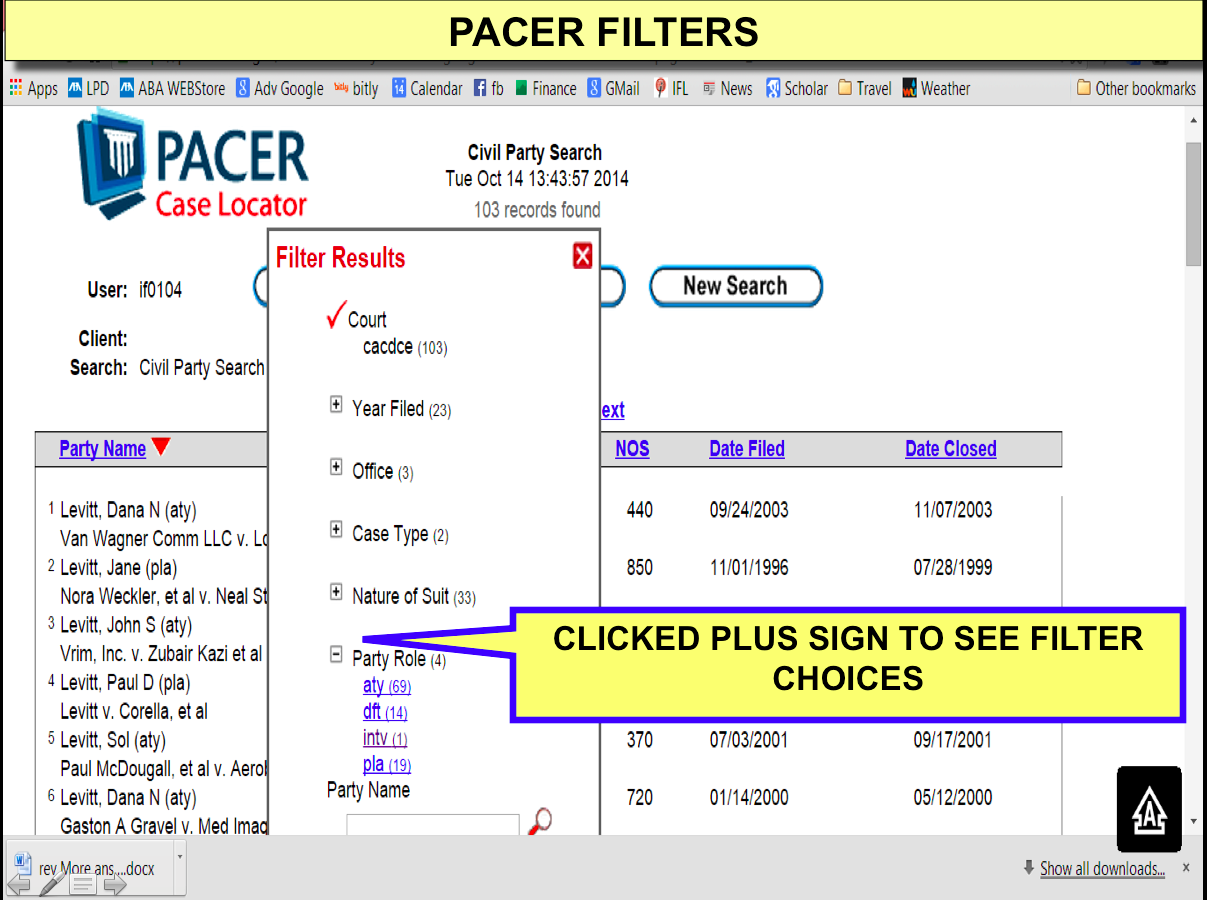
Clicking the Filter Results button opens a pop-up box that allows you to further filter your results by numerous criteria (e.g., Court Type, Court, Year Filed in the screenshot above). Clicking the plus sign next to any of the listed filters expands that filter to show the narrower filtering options
While many of the filter options seem to be the same as the column labels that we have been able to use for sorting for the past few years, one seems unique – the Party Role filter. Even though my test searches were by Party Name, it turns out the results also included attorney names. To see only party names in your results list, you can click the Filter Result tab, then click on the + sign to the left of the Party Role label (it will change to a minus sign), and then choose pla (plaintiff), dft (defendant), intv (intervenor). To see only attorney names in your results list, choose aty.



(Note that the Party Role filter does not appear for every search. In fact, the Party Role filter may be a limited test that PACER is conducting because I did not see that filter on the list that appeared in the pop-up box for any subsequent test searches.)
Who else has seen this filter?